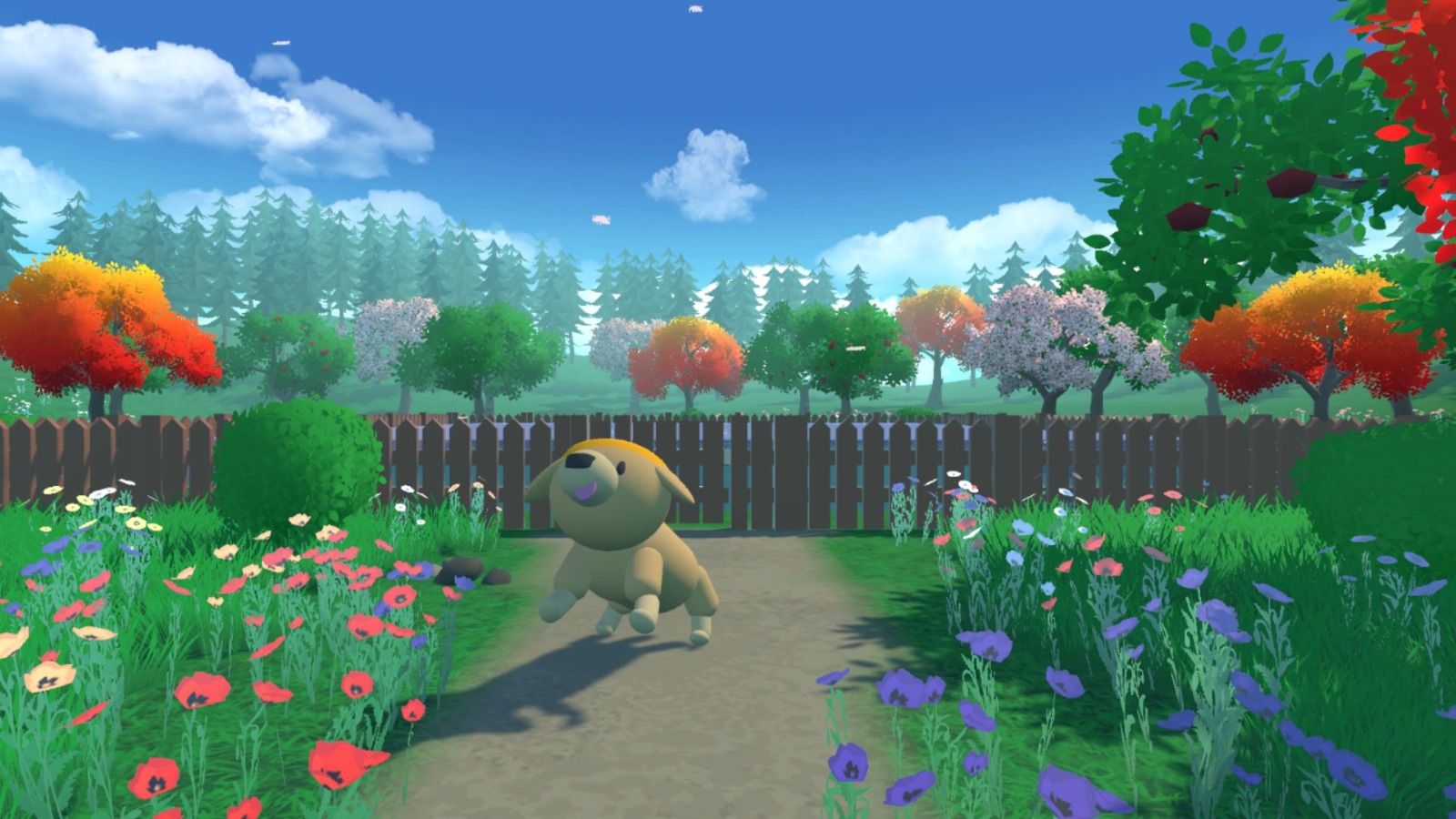
Bonus Unit 1: Let's train Huggy the Dog to fetch a stick
The environment 🎮
- Huggy the Dog, an environment created by Thomas Simonini based on Puppo The Corgi
The library used 📚
Session options > Accelerator > GPU
Clone the repository and install the dependencies 🔽
- We need to clone the repository, that contains ML-Agents.
%%capture
# Clone the repository (can take 3min)
!git clone --depth 1 https://github.com/Unity-Technologies/ml-agents
Ignore python version, it had problems with 3.10.13
%%capture
# Go inside the repository and install the package (can take 3min)
%cd ml-agents
!pip3 install --ignore-requires-python -e ./ml-agents-envs
!pip3 install --ignore-requires-python -e ./ml-agents
Download and move the environment zip file in ./trained-envs-executables/linux/
- Our environment executable is in a zip file.
- We need to download it and place it to
./trained-envs-executables/linux/
!mkdir ./trained-envs-executables
!mkdir ./trained-envs-executables/linux
We downloaded the file Huggy.zip from https://github.com/huggingface/Huggy using wget
!wget "https://github.com/huggingface/Huggy/raw/main/Huggy.zip" -O ./trained-envs-executables/linux/Huggy.zip
--2026-01-15 15:29:28--  https://github.com/huggingface/Huggy/raw/main/Huggy.zip
Resolving github.com (github.com)... 20.27.177.113
Connecting to github.com (github.com)|20.27.177.113|:443... connected.
HTTP request sent, awaiting response... 302 Found
Location: https://media.githubusercontent.com/media/huggingface/Huggy/main/Huggy.zip [following]
--2026-01-15 15:29:28--  https://media.githubusercontent.com/media/huggingface/Huggy/main/Huggy.zip
Resolving media.githubusercontent.com (media.githubusercontent.com)... 185.199.110.133, 185.199.111.133, 185.199.108.133, ...
Connecting to media.githubusercontent.com (media.githubusercontent.com)|185.199.110.133|:443... connected.
HTTP request sent, awaiting response... 200 OK
Length: 39214997 (37M) [application/zip]
Saving to: './trained-envs-executables/linux/Huggy.zip'

./trained-envs-exec 100%[===================>]  37.40M  25.1MB/s    in 1.5s

2026-01-15 15:29:30 (25.1 MB/s) - './trained-envs-executables/linux/Huggy.zip' saved [39214997/39214997]
%%capture
!unzip -d ./trained-envs-executables/linux/ ./trained-envs-executables/linux/Huggy.zip
Make sure your file is accessible
!chmod -R 755 ./trained-envs-executables/linux/Huggy
The State Space: what Huggy "perceives."
Huggy doesn't "see" his environment. Instead, we provide him information about the environment:
- The target (stick) position
- The relative position between himself and the target
- The orientation of his legs.
Given all this information, Huggy can decide which action to take next to fulfill his goal.
The Action Space: what moves Huggy can do
Joint motors drive huggy legs. It means that to get the target, Huggy needs to learn to rotate the joint motors of each of his legs correctly so he can move.
The Reward Function
The reward function is designed so that Huggy will fulfill his goal : fetch the stick.
Here, our goal is that Huggy goes towards the stick but without spinning too much. Hence, our reward function must translate this goal.
Our reward function:
- Orientation bonus: we reward him for getting close to the target.
- Time penalty: a fixed-time penalty given at every action to force him to get to the stick as fast as possible.
- Rotation penalty: we penalize Huggy if he spins too much and turns too quickly.
- Getting to the target reward: we reward Huggy for reaching the target.
Create the Huggy config file
import yaml
data={
    "behaviors": {
        "Huggy": {
            "trainer_type": "ppo",
            "hyperparameters": {
                "batch_size": 2048,
                "buffer_size": 20480,
                "learning_rate": 0.0003,
                "beta": 0.005,
                "epsilon": 0.2,
                "lambd": 0.95,
                "num_epoch": 3,
                "learning_rate_schedule": "linear",
            },
            "network_settings": {
                "normalize": True,
                "hidden_units": 512,
                "num_layers": 3,
                "vis_encode_type": "simple",
            },
            "reward_signals": {"extrinsic": {"gamma": 0.995, "strength": 1.0}},
            "checkpoint_interval": 200000,
            "keep_checkpoints": 15,
            "max_steps": 2e6,
            "time_horizon": 1000,
            "summary_freq": 50000,
        }
    }
}
with open('/kaggle/working/ml-agents/config/ppo/Huggy.yaml', 'w') as f:
    yaml.dump(data, f, default_flow_style=False)
In the case you want to modify the hyperparameters, you may edit them here
For instance if you want to save more models during the training (for now, we save every 200,000 training timesteps). You need to modify:
checkpoint_interval: The number of training timesteps collected between each checkpoint.keep_checkpoints: The maximum number of model checkpoints to keep.
Train our agent
To train our agent, we just need to launch mlagents-learn and select the executable containing the environment.
With ML Agents, we run a training script. We define four parameters:
mlagents-learn <config>: the path where the hyperparameter config file is.--env: where the environment executable is.--run-id: the name you want to give to your training run id.--no-graphics: to not launch the visualization during the training.
Train the model and use the --resume flag to continue training in case of interruption.
It will fail first time when you use
--resume, try running the block again to bypass the error.
The training will take 30 to 45min depending on your machine (don't forget to set up a GPU), go take a ☕️you deserve it 🤗.
!mlagents-learn ./config/ppo/Huggy.yaml --env=./trained-envs-executables/linux/Huggy/Huggy --run-id="Huggy2" --no-graphics
2026-01-15 15:29:51.923491: E external/local_xla/xla/stream_executor/cuda/cuda_dnn.cc:9261] Unable to register cuDNN factory: Attempting to register factory for plugin cuDNN when one has already been registered
2026-01-15 15:29:51.923625: E external/local_xla/xla/stream_executor/cuda/cuda_fft.cc:607] Unable to register cuFFT factory: Attempting to register factory for plugin cuFFT when one has already been registered
2026-01-15 15:29:52.066534: E external/local_xla/xla/stream_executor/cuda/cuda_blas.cc:1515] Unable to register cuBLAS factory: Attempting to register factory for plugin cuBLAS when one has already been registered

            ┐  ╖
        ╓╖╬│╡  ││╬╖╖
    ╓╖╬│││││┘  ╬│││││╬╖
 ╖╬│││││╬╜        ╙╬│││││╖╖                               ╗╗╗
 ╬╬╬╬╖││╦╖        ╖╬││╗╣╣╣╬      ╟╣╣╬    ╟╣╣╣             ╜╜╜  ╟╣╣
 ╬╬╬╬╬╬╬╬╖│╬╖╖╓╬╪│╓╣╣╣╣╣╣╣╬      ╟╣╣╬    ╟╣╣╣ ╒╣╣╖╗╣╣╣╗   ╣╣╣ ╣╣╣╣╣╣ ╟╣╣╖   ╣╣╣
 ╬╬╬╬┐  ╙╬╬╬╬│╓╣╣╣╝╜  ╫╣╣╣╬      ╟╣╣╬    ╟╣╣╣ ╟╣╣╣╙ ╙╣╣╣  ╣╣╣ ╙╟╣╣╜╙  ╫╣╣  ╟╣╣
 ╬╬╬╬┐     ╙╬╬╣╣      ╫╣╣╣╬      ╟╣╣╬    ╟╣╣╣ ╟╣╣╬   ╣╣╣  ╣╣╣  ╟╣╣     ╣╣╣┌╣╣╜
 ╬╬╬╜       ╬╬╣╣      ╙╝╣╣╬      ╙╣╣╣╗╖╓╗╣╣╣╜ ╟╣╣╬   ╣╣╣  ╣╣╣  ╟╣╣╦╓    ╣╣╣╣╣
 ╙   ╓╦╖    ╬╬╣╣   ╓╗╗╖            ╙╝╣╣╣╣╝╜   ╘╝╝╜   ╝╝╝  ╝╝╝   ╙╣╣╣    ╟╣╣╣
   ╩╬╬╬╬╬╬╦╦╬╬╣╣╗╣╣╣╣╣╣╣╝                                             ╫╣╣╣╣
      ╙╬╬╬╬╬╬╬╣╣╣╣╣╣╝╜
          ╙╬╬╬╣╣╣╜
             ╙

 Version information:
  ml-agents: 1.2.0.dev0,
  ml-agents-envs: 1.2.0.dev0,
  Communicator API: 1.5.0,
  PyTorch: 2.1.2
/opt/conda/lib/python3.10/multiprocessing/popen_fork.py:66: RuntimeWarning: os.fork() was called. os.fork() is incompatible with multithreaded code, and JAX is multithreaded, so this will likely lead to a deadlock.
  self.pid = os.fork()
[INFO] Connected to Unity environment with package version 2.2.1-exp.1 and communication version 1.5.0
[INFO] Connected new brain: Huggy?team=0
[INFO] Hyperparameters for behavior name Huggy:
	trainer_type:	ppo
	hyperparameters:
	  batch_size:	2048
	  buffer_size:	20480
	  learning_rate:	0.0003
	  beta:	0.005
	  epsilon:	0.2
	  lambd:	0.95
	  num_epoch:	3
	  shared_critic:	False
	  learning_rate_schedule:	linear
	  beta_schedule:	linear
	  epsilon_schedule:	linear
	checkpoint_interval:	200000
	network_settings:
	  normalize:	True
	  hidden_units:	512
	  num_layers:	3
	  vis_encode_type:	simple
	  memory:	None
	  goal_conditioning_type:	hyper
	  deterministic:	False
	reward_signals:
	  extrinsic:
	    gamma:	0.995
	    strength:	1.0
	    network_settings:
	      normalize:	False
	      hidden_units:	128
	      num_layers:	2
	      vis_encode_type:	simple
	      memory:	None
	      goal_conditioning_type:	hyper
	      deterministic:	False
	init_path:	None
	keep_checkpoints:	15
	even_checkpoints:	False
	max_steps:	2000000
	time_horizon:	1000
	summary_freq:	50000
	threaded:	False
	self_play:	None
	behavioral_cloning:	None
[INFO] Huggy. Step: 50000. Time Elapsed: 52.609 s. Mean Reward: 1.584. Std of Reward: 0.920. Training.
[INFO] Huggy. Step: 100000. Time Elapsed: 100.514 s. Mean Reward: 2.378. Std of Reward: 0.983. Training.
[INFO] Huggy. Step: 150000. Time Elapsed: 149.672 s. Mean Reward: 3.114. Std of Reward: 1.135. Training.
[INFO] Huggy. Step: 200000. Time Elapsed: 197.213 s. Mean Reward: 3.357. Std of Reward: 1.273. Training.
[INFO] Exported results/Huggy2/Huggy/Huggy-199802.onnx
[INFO] Huggy. Step: 250000. Time Elapsed: 247.358 s. Mean Reward: 3.434. Std of Reward: 1.537. Training.
[INFO] Huggy. Step: 300000. Time Elapsed: 295.564 s. Mean Reward: 3.726. Std of Reward: 1.520. Training.
[INFO] Huggy. Step: 350000. Time Elapsed: 344.198 s. Mean Reward: 3.818. Std of Reward: 1.556. Training.
[INFO] Huggy. Step: 400000. Time Elapsed: 396.385 s. Mean Reward: 3.747. Std of Reward: 1.737. Training.
[INFO] Exported results/Huggy2/Huggy/Huggy-399988.onnx
[INFO] Huggy. Step: 450000. Time Elapsed: 444.866 s. Mean Reward: 3.771. Std of Reward: 1.775. Training.
[INFO] Huggy. Step: 500000. Time Elapsed: 496.504 s. Mean Reward: 3.745. Std of Reward: 1.760. Training.
[INFO] Huggy. Step: 550000. Time Elapsed: 546.226 s. Mean Reward: 3.876. Std of Reward: 1.832. Training.
[INFO] Huggy. Step: 600000. Time Elapsed: 597.211 s. Mean Reward: 3.784. Std of Reward: 1.896. Training.
[INFO] Exported results/Huggy2/Huggy/Huggy-599908.onnx
[INFO] Huggy. Step: 650000. Time Elapsed: 646.109 s. Mean Reward: 3.803. Std of Reward: 1.793. Training.
[INFO] Huggy. Step: 700000. Time Elapsed: 695.599 s. Mean Reward: 3.831. Std of Reward: 1.783. Training.
[INFO] Huggy. Step: 750000. Time Elapsed: 747.512 s. Mean Reward: 3.887. Std of Reward: 1.763. Training.
[INFO] Huggy. Step: 800000. Time Elapsed: 796.619 s. Mean Reward: 3.777. Std of Reward: 1.783. Training.
[INFO] Exported results/Huggy2/Huggy/Huggy-799954.onnx
[INFO] Huggy. Step: 850000. Time Elapsed: 848.148 s. Mean Reward: 3.993. Std of Reward: 1.831. Training.
[INFO] Huggy. Step: 900000. Time Elapsed: 898.131 s. Mean Reward: 3.866. Std of Reward: 1.709. Training.
[INFO] Huggy. Step: 950000. Time Elapsed: 950.525 s. Mean Reward: 3.913. Std of Reward: 1.812. Training.
[INFO] Huggy. Step: 1000000. Time Elapsed: 999.985 s. Mean Reward: 3.853. Std of Reward: 1.724. Training.
[INFO] Exported results/Huggy2/Huggy/Huggy-999983.onnx
[INFO] Huggy. Step: 1050000. Time Elapsed: 1050.421 s. Mean Reward: 3.760. Std of Reward: 1.756. Training.
[INFO] Huggy. Step: 1100000. Time Elapsed: 1102.573 s. Mean Reward: 3.809. Std of Reward: 1.852. Training.
[INFO] Huggy. Step: 1150000. Time Elapsed: 1152.587 s. Mean Reward: 3.878. Std of Reward: 1.972. Training.
[INFO] Huggy. Step: 1200000. Time Elapsed: 1204.147 s. Mean Reward: 3.598. Std of Reward: 1.952. Training.
[INFO] Exported results/Huggy2/Huggy/Huggy-1199965.onnx
[INFO] Huggy. Step: 1250000. Time Elapsed: 1254.248 s. Mean Reward: 3.889. Std of Reward: 1.918. Training.
[INFO] Huggy. Step: 1300000. Time Elapsed: 1306.734 s. Mean Reward: 3.529. Std of Reward: 2.029. Training.
[INFO] Huggy. Step: 1350000. Time Elapsed: 1355.443 s. Mean Reward: 3.681. Std of Reward: 2.117. Training.
[INFO] Huggy. Step: 1400000. Time Elapsed: 1404.879 s. Mean Reward: 3.740. Std of Reward: 2.080. Training.
[INFO] Exported results/Huggy2/Huggy/Huggy-1399930.onnx
[INFO] Huggy. Step: 1450000. Time Elapsed: 1456.964 s. Mean Reward: 3.661. Std of Reward: 2.045. Training.
[INFO] Huggy. Step: 1500000. Time Elapsed: 1506.860 s. Mean Reward: 3.671. Std of Reward: 1.990. Training.
[INFO] Huggy. Step: 1550000. Time Elapsed: 1557.928 s. Mean Reward: 3.661. Std of Reward: 2.067. Training.
[INFO] Huggy. Step: 1600000. Time Elapsed: 1607.734 s. Mean Reward: 3.815. Std of Reward: 2.032. Training.
[INFO] Exported results/Huggy2/Huggy/Huggy-1599947.onnx
[INFO] Huggy. Step: 1650000. Time Elapsed: 1659.926 s. Mean Reward: 3.671. Std of Reward: 2.077. Training.
[INFO] Huggy. Step: 1700000. Time Elapsed: 1709.372 s. Mean Reward: 3.723. Std of Reward: 2.027. Training.
[INFO] Huggy. Step: 1750000. Time Elapsed: 1759.111 s. Mean Reward: 3.774. Std of Reward: 2.010. Training.
[INFO] Huggy. Step: 1800000. Time Elapsed: 1811.146 s. Mean Reward: 3.662. Std of Reward: 2.082. Training.
[INFO] Exported results/Huggy2/Huggy/Huggy-1799988.onnx
[INFO] Huggy. Step: 1850000. Time Elapsed: 1861.992 s. Mean Reward: 3.925. Std of Reward: 2.060. Training.
[INFO] Huggy. Step: 1900000. Time Elapsed: 1913.679 s. Mean Reward: 3.808. Std of Reward: 2.097. Training.
[INFO] Huggy. Step: 1950000. Time Elapsed: 1964.074 s. Mean Reward: 3.708. Std of Reward: 2.085. Training.
[INFO] Huggy. Step: 2000000. Time Elapsed: 2015.908 s. Mean Reward: 3.672. Std of Reward: 2.158. Training.
[INFO] Exported results/Huggy2/Huggy/Huggy-1999927.onnx
[INFO] Exported results/Huggy2/Huggy/Huggy-2000062.onnx
[INFO] Copied results/Huggy2/Huggy/Huggy-2000062.onnx to results/Huggy2/Huggy.onnx.
Push the agent to the 🤗 Hub
- Now that we trained our agent, we’re ready to push it to the Hub to be able to play with Huggy on your browser🔥.
To be able to share your model with the community there are three more steps to follow:
1️⃣ (If it's not already done) create an account to HF ➡ https://huggingface.co/join
2️⃣ Sign in and then, you need to store your authentication token from the Hugging Face website.
- Create a new token (https://huggingface.co/settings/tokens) with write role
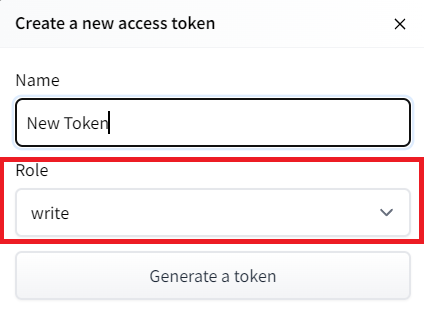
- Copy the token
- Run the cell below and paste the token
from huggingface_hub import notebook_login
notebook_login()
!git config --global credential.helper store
# from huggingface_hub import login

# # Replace 'your_new_write_token_here' with your actual token
# login(token='', add_to_git_credential=True)

import os
from kaggle_secrets import UserSecretsClient
from huggingface_hub import HfApi, login

# # 1. Manually delete the local token file if it exists
# token_path = os.path.expanduser("~/.cache/huggingface/token")
# if os.path.exists(token_path):
#     os.remove(token_path)
#     print("🗑️ Old cached token deleted.")

# Fetch the secret
user_secrets = UserSecretsClient()
hf_token = user_secrets.get_secret("HF_TOKEN")


# Force login
login(token=hf_token, add_to_git_credential=True)

# 2. Verify identity and permissions
api = HfApi()
user_info = api.whoami()
print(f"✅ Successfully logged in as: {user_info['name']}")
print(f"✅ Token has Write access: {user_info['auth']['type'] == 'WRITE'}")
Token is valid (permission: fineGrained).
Your token has been saved in your configured git credential helpers (store).
Your token has been saved to /root/.cache/huggingface/token
Login successful
✅ Successfully logged in as: Chiz
✅ Token has Write access: False
And we define 4 parameters:
--run-id: the name of the training run id.--local-dir: where the agent was saved, it’s results/<run_id name>, so in my case results/First Training.--repo-id: the name of the Hugging Face repo you want to create or update. It’s always/ If the repo does not exist it will be created automatically --commit-message: since HF repos are git repository you need to define a commit message.
Use your own --repo-id
!mlagents-push-to-hf --run-id="HuggyTraining" --local-dir="/kaggle/working/ml-agents/results/Huggy2" --repo-id="Chiz/ppo-Huggy" --commit-message="Huggy"
[INFO] This function will create a model card and upload your HuggyTraining into HuggingFace Hub. This is a work in progress: If you encounter a bug, please send open an issue
[INFO] Pushing repo HuggyTraining to the Hugging Face Hub
Huggy-1399930.onnx:   0%|                           | 0.00/2.27M [00:00<?, ?B/s]
Huggy-1199965.pt:   0%|                             | 0.00/13.5M [00:00<?, ?B/s]

Huggy-1199965.onnx:   0%|                           | 0.00/2.27M [00:00<?, ?B/s]


Upload 25 LFS files:   0%|                               | 0/25 [00:00<?, ?it/s]


Huggy-1399930.pt:   0%|                             | 0.00/13.5M [00:00<?, ?B/s]


Huggy-1599947.onnx:   0%|                           | 0.00/2.27M [00:00<?, ?B/s]
Huggy-1199965.pt:  25%|████▉               | 3.36M/13.5M [00:00<00:00, 33.6MB/s]


Huggy-1399930.pt:  21%|████▏               | 2.87M/13.5M [00:00<00:00, 19.3MB/s]


Huggy-1399930.pt:  36%|███████▏            | 4.82M/13.5M [00:00<00:01, 7.44MB/s]
Huggy-1199965.pt:  50%|█████████▉          | 6.72M/13.5M [00:00<00:00, 10.2MB/s]


Huggy-1399930.pt:  68%|█████████████▌      | 9.19M/13.5M [00:00<00:00, 15.1MB/s]
Huggy-1399930.onnx: 100%|██████████████████| 2.27M/2.27M [00:01<00:00, 1.68MB/s]


Huggy-1399930.pt:  87%|█████████████████▎  | 11.7M/13.5M [00:01<00:00, 6.96MB/s]
Huggy-1599947.pt:   0%|                             | 0.00/13.5M [00:00<?, ?B/s]


Huggy-1599947.onnx: 100%|██████████████████| 2.27M/2.27M [00:01<00:00, 1.20MB/s]
Huggy-1199965.onnx: 100%|██████████████████| 2.27M/2.27M [00:01<00:00, 1.16MB/s]


Huggy-1799988.onnx:   0%|                           | 0.00/2.27M [00:00<?, ?B/s]


Upload 25 LFS files:   4%|▉                      | 1/25 [00:02<00:54,  2.25s/it]


Huggy-1199965.pt: 100%|████████████████████| 13.5M/13.5M [00:02<00:00, 5.69MB/s]
Huggy-1399930.pt: 100%|████████████████████| 13.5M/13.5M [00:02<00:00, 5.60MB/s]
Huggy-1599947.pt: 100%|████████████████████| 13.5M/13.5M [00:00<00:00, 16.9MB/s]


Huggy-199802.onnx:   0%|                            | 0.00/2.27M [00:00<?, ?B/s]
Huggy-199802.pt:   0%|                              | 0.00/13.5M [00:00<?, ?B/s]


Huggy-1999927.onnx:   0%|                           | 0.00/2.27M [00:00<?, ?B/s]
Huggy-1999927.onnx: 100%|██████████████████| 2.27M/2.27M [00:00<00:00, 8.27MB/s]
Huggy-1799988.pt: 100%|████████████████████| 13.5M/13.5M [00:00<00:00, 15.5MB/s]


Huggy-1999927.pt:   0%|                             | 0.00/13.5M [00:00<?, ?B/s]


Huggy-1999927.pt:  40%|████████            | 5.42M/13.5M [00:00<00:00, 54.2MB/s]


Huggy.onnx:   0%|                                   | 0.00/2.27M [00:00<?, ?B/s]


Huggy-1999927.pt:  80%|████████████████    | 10.8M/13.5M [00:00<00:00, 16.4MB/s]
Huggy-1799988.onnx: 100%|██████████████████| 2.27M/2.27M [00:01<00:00, 1.20MB/s]

Huggy-199802.pt:  99%|████████████████████▊| 13.4M/13.5M [00:01<00:00, 7.96MB/s]


Upload 25 LFS files:  28%|██████▍                | 7/25 [00:04<00:08,  2.02it/s]

Huggy-199802.onnx: 100%|███████████████████| 2.27M/2.27M [00:01<00:00, 1.23MB/s]


Huggy.onnx: 100%|██████████████████████████| 2.27M/2.27M [00:01<00:00, 1.72MB/s]


Huggy-399988.onnx:   0%|                            | 0.00/2.27M [00:00<?, ?B/s]

Huggy-2000062.pt:  77%|███████████████▎    | 10.4M/13.5M [00:00<00:00, 16.4MB/s]


Huggy-399988.pt:   0%|                              | 0.00/13.5M [00:00<?, ?B/s]


Huggy-199802.pt: 100%|█████████████████████| 13.5M/13.5M [00:02<00:00, 5.35MB/s]


Upload 25 LFS files:  40%|████████▊             | 10/25 [00:05<00:06,  2.20it/s]
Huggy-1999927.pt: 100%|████████████████████| 13.5M/13.5M [00:02<00:00, 5.63MB/s]
Huggy-599908.onnx: 100%|███████████████████| 2.27M/2.27M [00:00<00:00, 7.70MB/s]


Huggy-2000062.pt:  91%|██████████████████▎ | 12.4M/13.5M [00:01<00:00, 6.40MB/s]


Upload 25 LFS files:  48%|██████████▌           | 12/25 [00:05<00:04,  2.65it/s]
Huggy-599908.pt:   0%|                              | 0.00/13.5M [00:00<?, ?B/s]


Huggy-799954.onnx:   0%|                            | 0.00/2.27M [00:00<?, ?B/s]


Huggy-599908.pt: 100%|█████████████████████| 13.5M/13.5M [00:00<00:00, 29.7MB/s]


Huggy-399988.pt:  90%|██████████████████▉  | 12.2M/13.5M [00:01<00:00, 7.39MB/s]
Huggy-399988.onnx: 100%|███████████████████| 2.27M/2.27M [00:01<00:00, 1.22MB/s]
Huggy-2000062.pt: 100%|████████████████████| 13.5M/13.5M [00:02<00:00, 5.83MB/s]
Huggy-999983.onnx:   0%|                            | 0.00/2.27M [00:00<?, ?B/s]


Upload 25 LFS files:  56%|████████████▎         | 14/25 [00:06<00:04,  2.37it/s]

Huggy-799954.pt: 100%|█████████████████████| 13.5M/13.5M [00:00<00:00, 28.2MB/s]

Huggy-399988.pt: 100%|█████████████████████| 13.5M/13.5M [00:02<00:00, 5.52MB/s]

checkpoint.pt:  33%|███████▍               | 4.39M/13.5M [00:00<00:00, 37.2MB/s]


Upload 25 LFS files:  64%|██████████████        | 16/25 [00:07<00:03,  2.51it/s]


Huggy-999983.pt: 100%|█████████████████████| 13.5M/13.5M [00:00<00:00, 17.0MB/s]
Huggy-799954.onnx: 100%|███████████████████| 2.27M/2.27M [00:01<00:00, 1.17MB/s]
events.out.tfevents.1768491001.be5716e39cc4.145.0: 100%|█| 389k/389k [00:00<00:0


Huggy.onnx:   0%|                                   | 0.00/2.27M [00:00<?, ?B/s]


Upload 25 LFS files:  76%|████████████████▋     | 19/25 [00:08<00:01,  3.24it/s]
Huggy-999983.onnx: 100%|███████████████████| 2.27M/2.27M [00:01<00:00, 1.24MB/s]

checkpoint.pt:  92%|█████████████████████▏ | 12.5M/13.5M [00:01<00:00, 7.84MB/s]


checkpoint.pt: 100%|███████████████████████| 13.5M/13.5M [00:02<00:00, 5.96MB/s]
Huggy.onnx: 100%|██████████████████████████| 2.27M/2.27M [00:01<00:00, 1.24MB/s]


Upload 25 LFS files:  92%|████████████████████▏ | 23/25 [00:09<00:00,  2.69it/s]


Upload 25 LFS files: 100%|██████████████████████| 25/25 [00:10<00:00,  2.50it/s]
[INFO] Your model is pushed to the hub. You can view your model here: https://huggingface.co/Chiz/ppo-Huggy
Else, if everything worked you should have this at the end of the process(but with a different url 😆) :
Your model is pushed to the hub. You can view your model here: https://huggingface.co/ThomasSimonini/ppo-Huggy
It’s the link to your model repository. The repository contains a model card that explains how to use the model, your Tensorboard logs and your config file. What’s awesome is that it’s a git repository, which means you can have different commits, update your repository with a new push, open Pull Requests, etc.
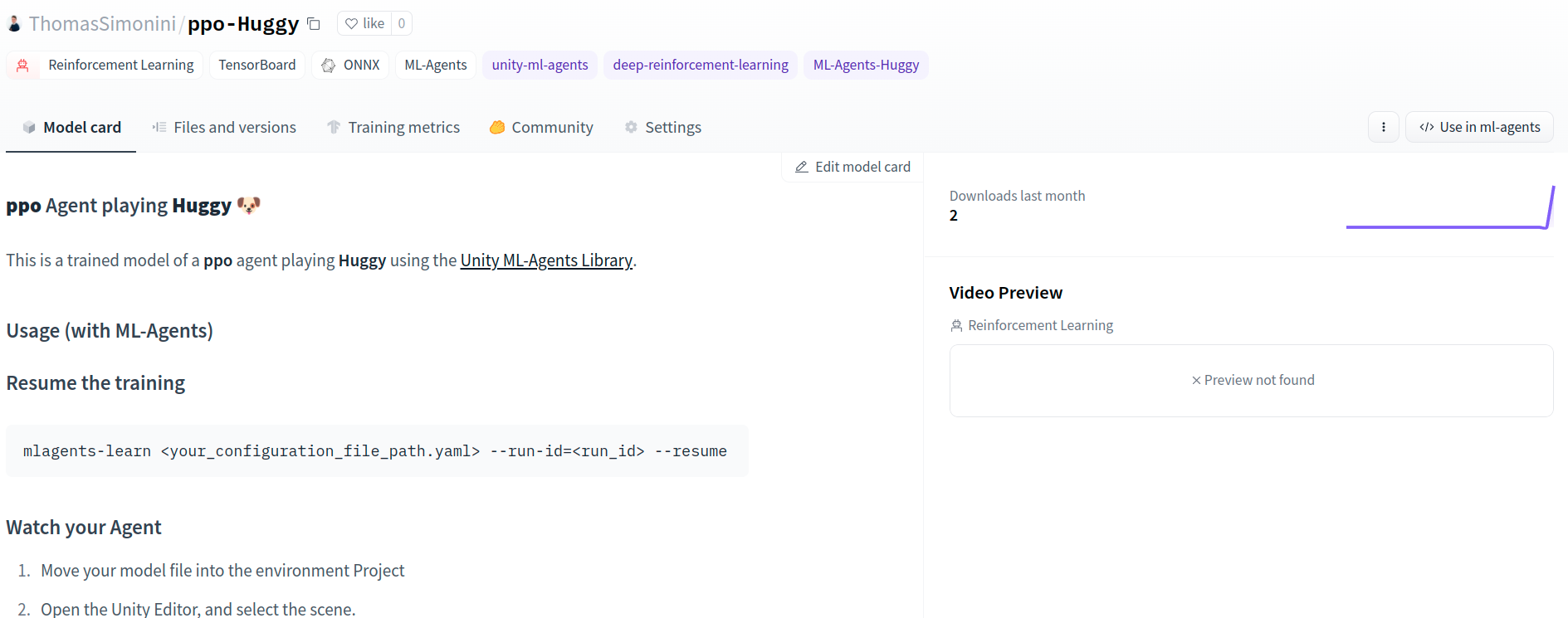
But now comes the best: being able to play with Huggy online 👀.
Play with your Huggy 🐕
This step is the simplest:
Open the game Huggy in your browser: https://huggingface.co/spaces/ThomasSimonini/Huggy
Click on Play with my Huggy model
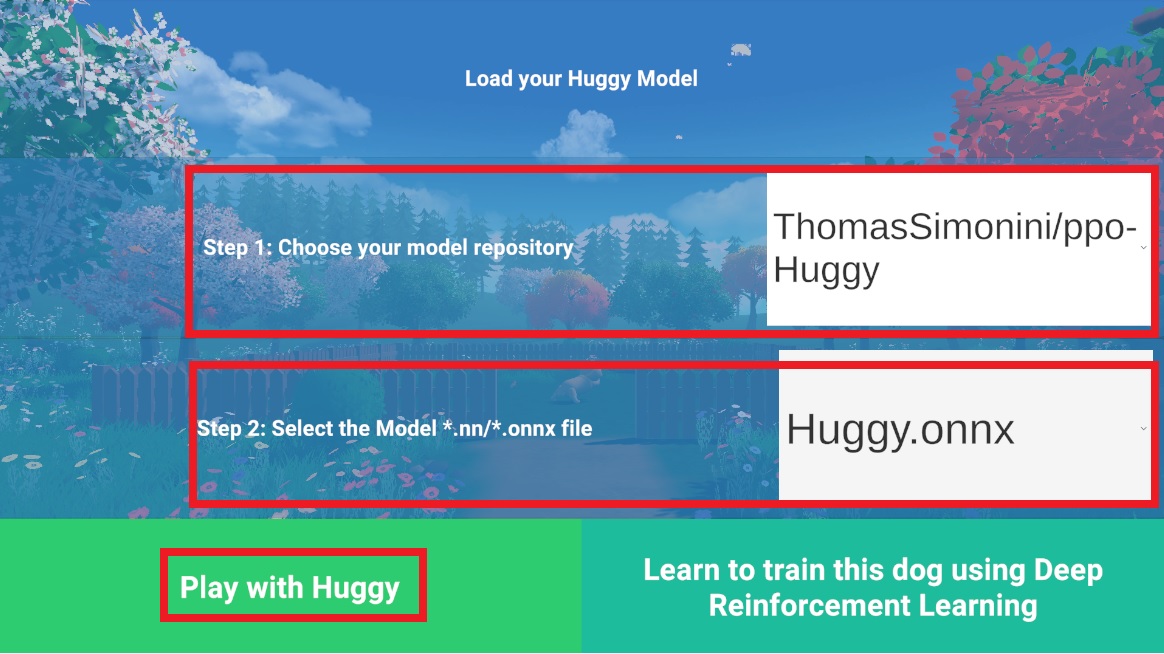
In step 1, choose your model repository which is the model id (in my case ThomasSimonini/ppo-Huggy).
In step 2, choose what model you want to replay:
- I have multiple ones, since we saved a model every 500000 timesteps.
- But since I want the more recent, I choose
Huggy.onnx
👉 What’s nice is to try with different models steps to see the improvement of the agent.
Congrats on finishing this bonus unit!
You can now sit and enjoy playing with your Huggy 🐶. And don't forget to spread the love by sharing Huggy with your friends 🤗. And if you share about it on social media, please tag us @huggingface and me @simoninithomas